Main Toolbars
CartoPac Touch includes two main toolbars that display at the top and bottom of the main window. The toolbars include buttons to manipulate the map data (top) and icons (bottom) for working with data or customizing the application.
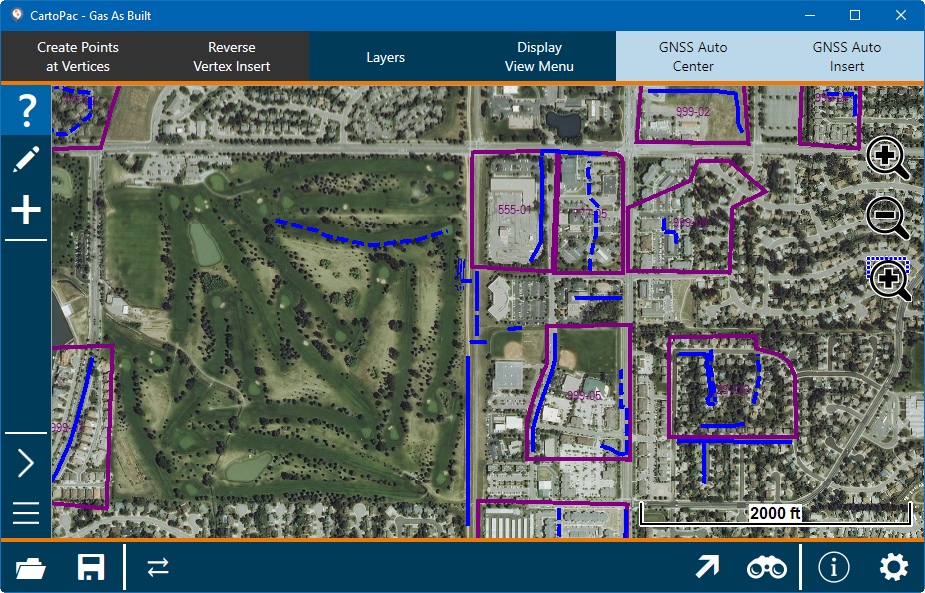
Touch Tool Bar
Select the  icon to open both toolbars.
The top toolbar includes the following buttons:
-
Create Points at Vertices — currently disabled in Touch.
-
Reverse Vertex Insert — reverses the start and end points of the selected segment between an inserted vertex with the previous vertex in a line or polygon.
-
Layers — edit properties and other information about a selected layer. Refer to Edit Layers Properties for more information.
-
Display View Menu — options for viewing a background map, viewing a grid on the map, or zooming to a record. Refer to Display View Menu for more information.
-
GNSS Auto Center — automatically centers the GNSS lock cursor in the middle of the map based on the location of the GPS receiver.
-
GNSS Auto Insert — automatically adds to your line or polygon as you walk or the GPS updates.
The bottom toolbar includes the following icons:
-
Open Project — select project and/or background maps.
-
Save Changes — save any changes made to the project.
-
Connect Peripherals — connect to selected peripherals.
-
Go To Coordinate — jump to a selected coordinate.
-
Find Coordinate — search for a selected coordinate.
-
About CartoPac Mobile Touch CartoPac Mobile — details about the application.
-
Touch Options — options for map, display, units, backup, GNSS, offset, peripherals, navigation, software, and drivers.