Exchange Surveys with External Organizations
Internal organizations (operators) and external organizations (contractors) use the same Survey Hub tools. The difference is who sends work and who returns verified data. Both organizations must have an Active trust relationship before surveys can be exchanged.
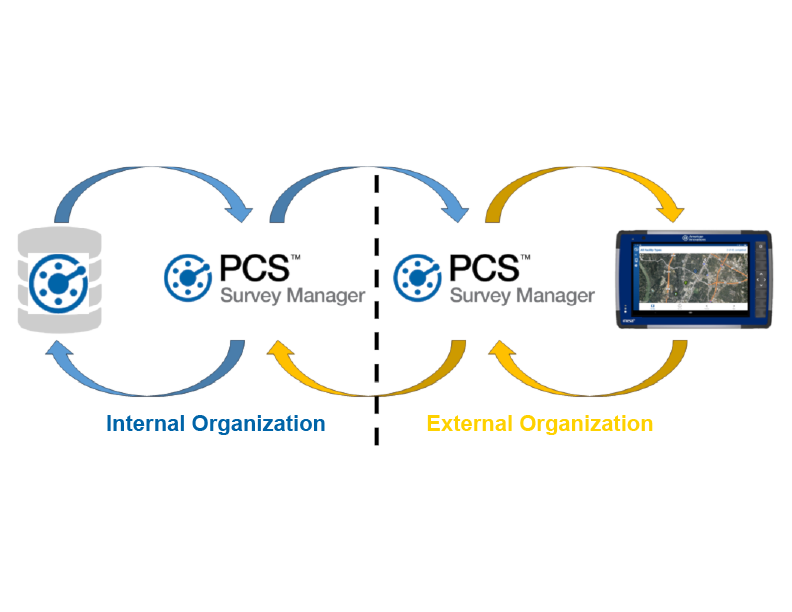
Internal Organization (Operator) workflow (outbound from PCS to external organization, e.g. a contractor)
-
Export surveys from PCS to the cloud.
-
In Survey Hub, use Cloud Import and Place Survey to add surveys to your Navigation hierarchy. See Import Surveys from Cloud in Survey Hub.
-
Create group(s) for the work.
-
Assign groups to an external organization (for example, a trusted contractor). See Assign Groups to PCS Field Data Collector Users.
External Organization workflow (field work and return)
-
In the contractor Survey Hub, Cloud Import surveys sent by the external organization. Accept by placing on the sidebar, or reject with a reason. Acceptance places the survey and signals In Progress for the internal organization.
-
Create group(s) and assign them to your own Field Data Collector users (internal users only). Field Data Collector steps are unchanged.
-
After field upload, review and Include or Exclude records, then Export Survey back to the internal organization. See Include or Exclude Survey Records.
Internal Organization workflow (return path)
-
Review data returned from the external organization in Survey Hub (Include/Exclude as needed).
-
Export Survey and import verified data to PCS.
Data uploaded from a external organization's PCS Field Data Collectorinstance to the external organization's PCS Survey Manager instance is not visible to the internal organization until the external organization exports it. The external organization can QA the data before the internal organization sees it.
For status colors and how each organization sees progress, see Survey Hub Statuses and Completion.