RM4210/RM4250 Readings Schedules
The RM4210 and RM4250 include AC and DC current density for test coupons, AC and DC pipe-to-soil, an analog channel, instant off, and AC drain current. Each of these readings can be configured with one or two measurement schedules. Readings from unit channels (also referred to as Readings) are taken and reported based on the measurement schedules created in the Reporting & Power pane. The reading is enabled if a schedule has been selected for it. Otherwise, the channel is disabled. Refer to RM4210/RM4250 and RM4211/RM4251 Transmission Settings Fields for more information on creating reporting schedules.
You must have Admin user permission to edit unit data. See your system administrator or refer to Unit Group Security for more information.
Reports and graphs that display RM4210 or RM4250 unit information and performance can be generated through the Reports menu. Refer to AC Monitoring Reports for more information.
Complete the following steps to add or remove scheduled measurement readings for each RM4210 or RM4250 Reading:
-
Click
 Readings in the Unit Setup pane on the Unit Admin page.
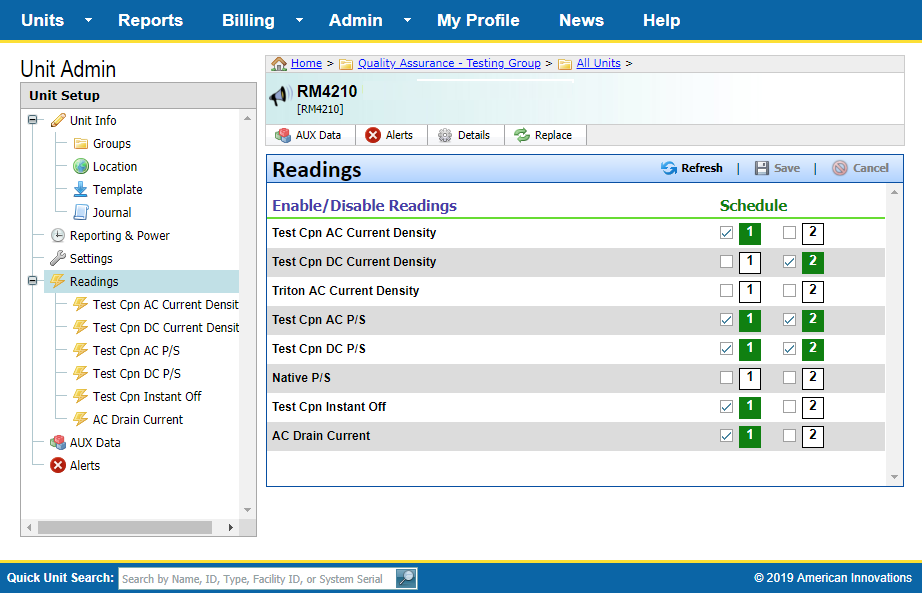
RM4210 and RM4250 Reading Pane
-
For each Reading, select either Schedule 1 and/or Schedule 2. Up to two schedules can be applied to a channel.
-
To disable a Reading, do not select a schedule for it. Disabled Readings will not display under
Readings.