Use Ribbon to Modify a Report Form Page Setup
Use the ribbon to set simple page settings. Options available from the ribbon include selecting a standard page size, defining page margins, and choosing an orientation for the page. To set more advanced page properties or to define a custom page size or use a custom page size that is already defined in your printer settings, or to set watermark options, use the Properties pane. Refer to Use Properties Pane to Modify a Report Form Page Setup.
-
Click
 Page Setup to open the Page Setup window.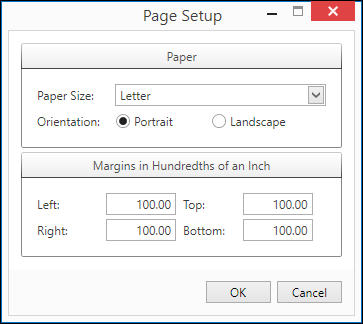
Page Setup Window
-
Select a size from the Paper Size drop-down.
-
Select an Orientation radio button.
-
Enter a margins in inches for the Left, Right, Top, and Bottom margins in the fields provided.
-
Click OK to save the page settings and close the Page Setup window or click Cancel to undo any changes made in the Page Setup window before closing the window.