Field Caption Colors
PCS uses a color code system in field captions throughout the system that allows you to easily identify one data type from another. Below is an example of how column headers and field names are color-coded in the data grid and layout theme, respectively.
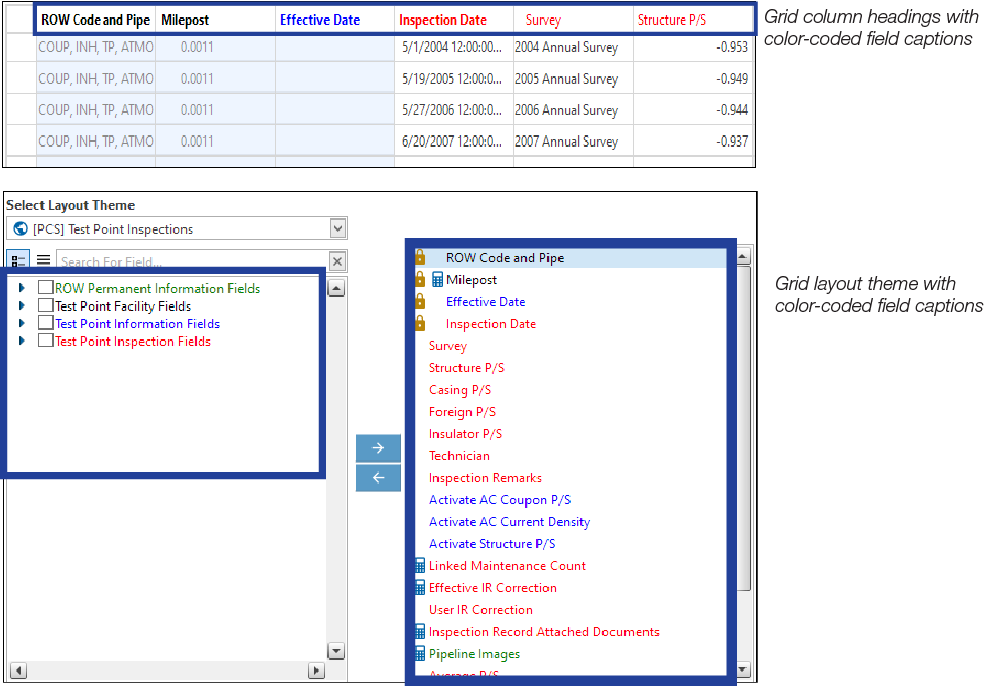
Colors in Field Captions
Field captions in column headings of a data entry grid are color-coded to help distinguish different data types, such as information, inspection, and maintenance fields. Likewise, field captions in selection lists are also color-coded when creating themes in the Customize tab. The following table identifies the different data types with corresponding colors.
|
Data Type |
Color |
|---|---|
|
Facility Field |
Black |
|
Facility Information Field |
Blue |
|
Inspection Field |
Red |
|
Maintenance Field |
Red |
|
ROW and Pipeline Field |
Green |
|
All Others |
Black |