Replace All Values
You can replace a values in all fields of a selected grid column with the same value.
The Replace All Values command is not available for read-only grid columns, fields in a mini-grid, or picklist fields.
Complete the following steps to replace all values in a grid column:
-
Right-click the grid column and select Replace All Values in the shortcut menu.

Replace All Values Shortcut
-
In the Replace All Values window, select a value from the drop-down list that will be used to replace the current value in all fields of the selected grid column.
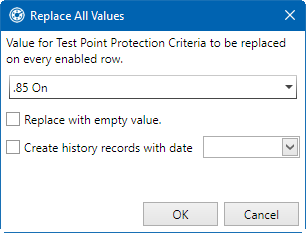
Replace All Values Window
-
Select Replace with empty value if you would like the fields to be replaced with no value.
-
Select Create history records with date and select a date from the drop-down calendar if you would like to create history records with the same date for all fields.
-
Click OK to save changes.