Reset Over-Current
The RM4210 reports the status of two relays (switches) in the Relay States pane of the Unit Overview window: the test coupon relay and the Triton relay.
The test coupon relay is normally in a Closed state. While in this state, the indicator bubble will be gray, as shown below:
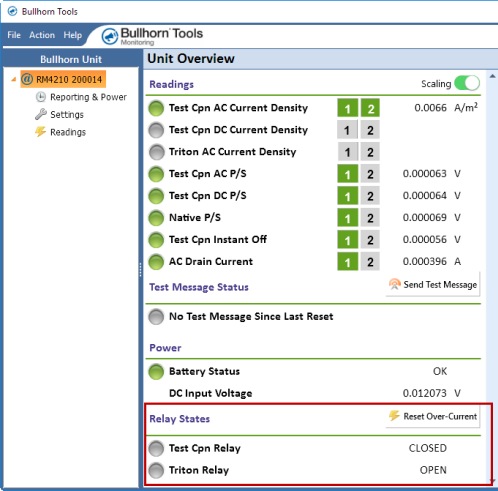
Relays in Normal State
If the test coupon relay (Test Cpn Relay) is tripped due to an over-current condition, the relay goes into an Open state and displays in the Relay States pane as in alarm (gray bubble turns to red). Also, the test coupon's AC and DC current density readings will not display, and the AC and DC pipe-to-soil and instant off readings display as INVALID in both Bullhorn Tools and the Bullhorn Web account.
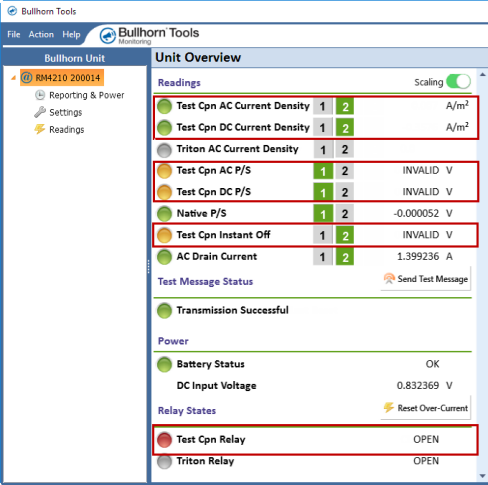
Test Coupon Relay in Alarm and Associated Readings
The RM4210 then sends an alarm packet to the Bullhorn Web account. The unit will attempt to automatically reset the relay after 1 minute. If the automatic reset is unsuccessful, the relay will stay in alarm state, and another over-current packet is sent to the Bullhorn Web account. If the over-current protection triggers again within 10 minutes after the automatic reset, the test coupon relay will stay permanently open until it is reset either with Bullhorn Tools or from an over-the-air command from the Bullhorn Web account. If this reset is successful, the relay's state returns to normal (gray bubble) and an alarm clear packet is sent. If it is unsuccessful, the over-current condition may still be present and need additional action.
The packets that are sent to your Bullhorn Web account can be viewed on the Unit Detail page from any of these sources:
-
Last Packet Type field in left pane
-
Last Alarm/Event Packet field in left pane (shows date and time)
-
Activity, Alerts (if the alert is enabled), and/or Incoming Packets tabs
The Triton relay (Triton Relay) is normally in an Open state and only changes state when taking a measurement. If an over-current condition occurs, preventing the Triton relay from closing during the measurement, the relay will go into an alarm state. A packet with data log is sent to the Bullhorn Web account, and the Triton AC Coupon Current Density reading be invalid. The unit will continue to retry taking a measurement. Once the over-current condition has been corrected, the next scheduled measurement will succeed, and the relay's state will return to normal. The Triton relay does not need to be reset.
The packets that are sent to your Bullhorn Web account can be viewed on the Unit Detail page from any of these sources:
-
Last Packet Type field in left pane
-
Last Alarm/Event Packet field in left pane (shows date and time)
-
Activity, Alerts (if the alert is enabled), and/or Incoming Packets tabs
Complete the following steps to reset the test coupon relay (Test Cpn Relay) after any over-current issues have been resolved:
The reset over-current function only applies to the test coupon relay; the Triton relay is not affected when you reset over-current.
-
Click the
 Reset Over-Current button or click Action > Reset Over-Current from the main menu.
-
Click OK when the Reset Over-Current Complete dialog box displays.
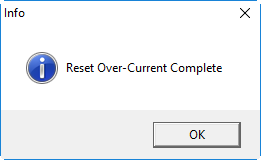
Reset Over-Current Complete
The indicator bubble next to Test Cpn Relay will return to gray, and the state will be CLOSED.
If the over-current issue was not resolved before resetting the relay, the relay will return to an Open state and remain in alarm. The over-current condition must be resolved before the relay can be reset to Closed.