Troubleshooting a Unit that Is Not Charging
Any of the following issues may be the cause of why your remote monitoring unit may not be charging correctly:
-
The battery is old and needs to be replaced.
-
The charger is not putting out any DC volts.
-
The charger is putting out a voltage that is too low to charge the battery.
-
The fuse is bad on the unit.
-
The charger wires are put in with the wrong polarity.
-
The unit is over reporting, and the charger cannot keep up with the drain on the battery.
-
The unit is damaged and needs to be sent in for evaluation.
To troubleshoot this issue, follow the steps below:
-
When the power supply output is over 12 volts DC and the battery is not charging over 12 volts DC then it needs to be replaced.
-
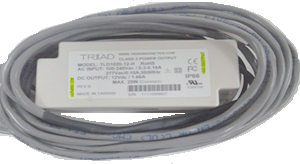
If you are not seeing 12 volts DC at the units DC input then the charger needs to be checked to see if it is attached to a 120 or 240 volt AC source. If it is then the charger is bad.
-
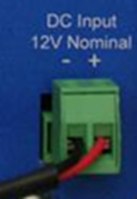
Remove the phoenix connector from the unit and measure the DC voltage without it being hooked to the unit. If the voltage is not over 12 volts then check the battery.
-
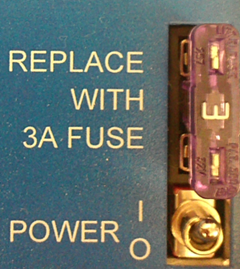
Check the fuse to make sure it has not blown. Power the unit off when removing or replacing the fuse.
-
If you see 12 volts DC at the unit, make sure that the polarity is correct - black wire on the left and the red wire on the right.
-
When a unit is reporting more than expected, this could cause a drain on the battery that the charger cannot keep up with.
-
If all previous steps have been performed and a new battery will not hold a charge, the unit will need to be sent in for evaluation.