One CP-protected Coupon
These instructions detail how to wire a single CP-protected coupon (with either one or two wires) to measure AC and/or DC pipe-to-soil, AC and/or DC current density, and instant off. Refer to the following figures for reference.

RM4210/RM4250 Wiring Harness

Wiring Diagram - Single CP-Protected Coupon
If the coupon has one wire connecting it to the test station, connect both the red Test Cpn 1 wire and the blue Test Cpn 2 from the RM4210/RM4250 wiring harness to the test station where the coupon wire is connected.
If the coupon has two wires connecting it to the test station, complete the following steps:
-
Connect one of the coupon wires to one side of the switch on the test station. Connect the red Test Cpn1 wire from the RM4210/RM4250 wiring harness to the other side of the switch.
-
Connect the blue Test Cpn 2 wire from the RM4210/RM4250 wiring harness to the point on the test station where the second coupon wire is connected.
-
Cap off the orange AC Coupon wire from the RM4210/RM4250 wiring harness. It is not used for this set up.
To set up for this type of measurement on Bullhorn Web, complete the following:
-
Make note of the size of the CP-protected coupon (Protected Cpn 1 in the wiring diagram). This data will be entered in Bullhorn Web using the following steps:
-
Go to the Unit Setup page for the unit.
-
Under Settings, enter the CP-protected coupon size in the Test Coupon Size field.
-
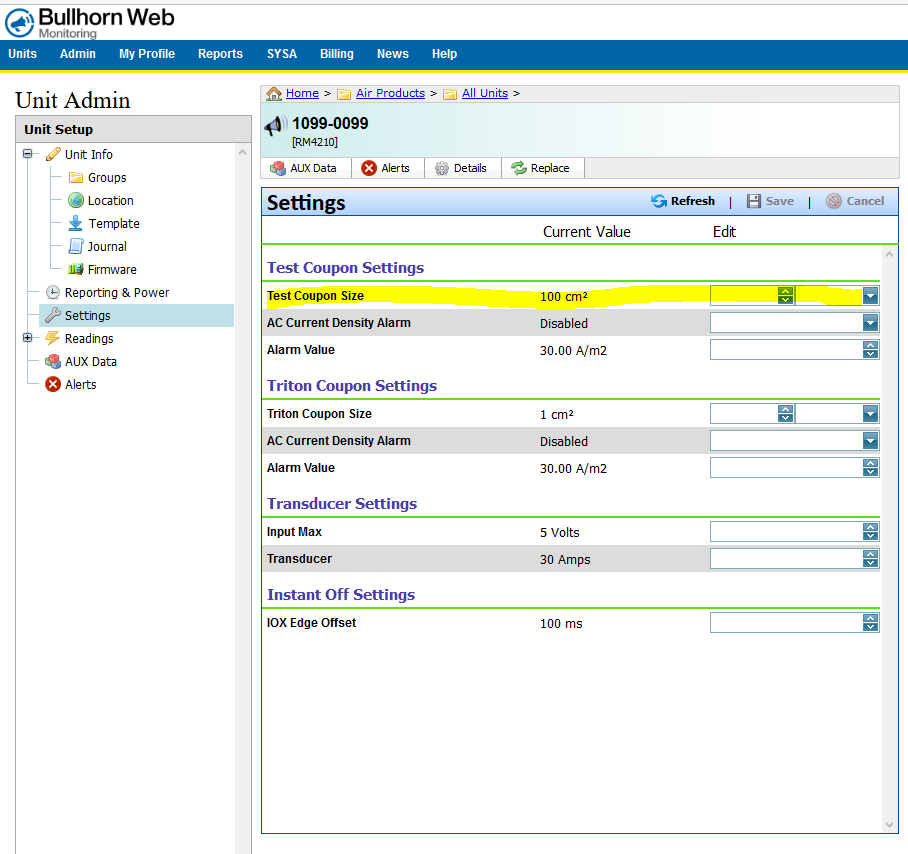
Unit Setup for Test Coupon Settings
Remove any switch or jumper on the test station head that is used to connect the CP-protected coupon (AC Coupon or Test Coupon) to the Structure, where the CP-protected coupon is used to measure AC current density or instant off.