How Do I Remove or Install the DVM from the Allegro AX?
If the DVM needs to be replaced or re-calibrated, contact Technical Support at support@aiworldwide.com.
Before removing or installing the DVM, power off the Allegro AX.
Complete the following steps to remove or install the DVM:
Refer to the following diagram to remove or install the DVM1110 into the Allegro AX.
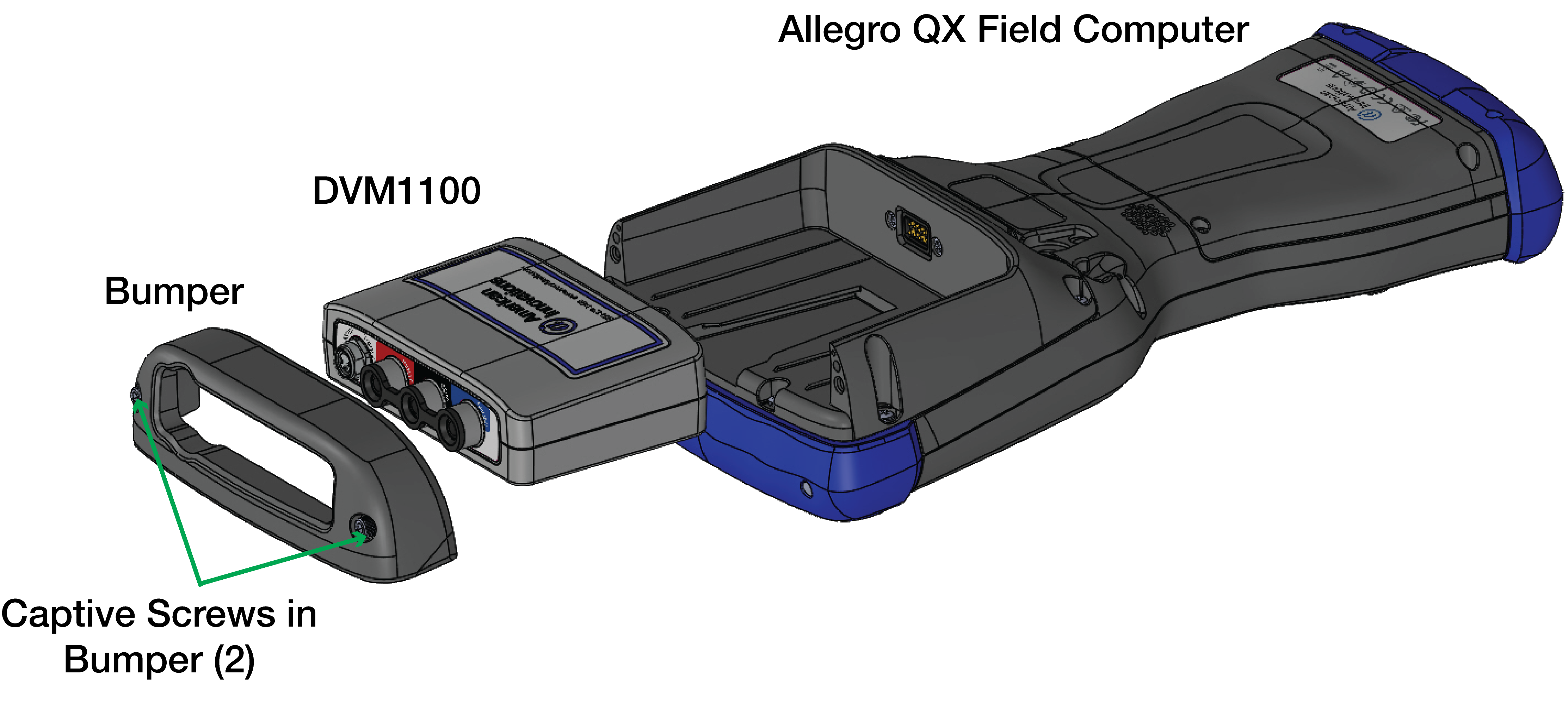
Installing the DVM1110
It is recommended to clean the contacts on both the DVM1110 and the Allegro with isopropyl alcohol and a soft cotton cloth before installation on units that have been in the field.
Complete the following steps to remove the DVM1110 from the Allegro AX:
-
Remove the protective bumper from the Allegro AX using a 7/64" hex screwdriver to loosen the two captive screws.
-
Slide the DVM1110 out of the Allegro AX.
-
Place the bumper back on the Allegro AX.
-
Secure bumper with the two captive screws in the bumper with the 7/64" hex screwdriver.
Complete the following steps to install the DVM1110 into the Allegro AX:
-
Remove the protective bumper from the Allegro AX using a 7/64" hex screwdriver to loosen the two captive screws.
-
Slide the DVM1110 into the back of the Allegro AX.
-
Place the bumper back on the Allegro AX.
-
Secure bumper with the two captive screws in the bumper with the 7/64" hex screwdriver.
Was this topic useful? Please email your feedback to us at content@aiworldwide.com.