How to Change the Screen Brightness on the Allegro MX
There are three ways to change the brightness of the screen on the Allegro.
Increase/Decrease the Brightness with the Keyboard
Press the <Orange> and <Up> keys to increase the brightness of the screen; press the <Orange> and <Down> keys to decrease the brightness of the screen.
Adjust the Brightness in System Settings
To change the screen brightness on the Allegro device, do the following:
-
Tap the Start button and tap Settings from the
-
Tap the System
-
Tap to open Backlight settings and tap the
-
Move the
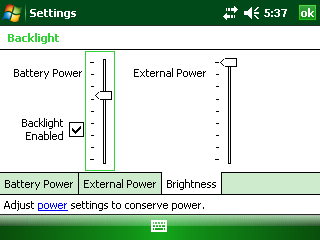
Brightness Settings
Toggle the Backlight On/Off
The screen backlight (brightness) can be turned on or off using the keyboard. To toggle the backlight on or off, press the <Orange> and <F
Was this topic useful? Please email your feedback to us at content@aiworldwide.com.